How to Manage Dialogue and Lettering in AI-Generated Comics
For decades, comics have been a great way to visualize what novels and textbooks could not convey. No matter the type of story, it is possible to give real depth and substance to characters.
Now, with AI comic lettering, it has become easier than ever before to create even the most complex comics. Comic generators like PixAI allow users to follow a prompt, creating images, dialogue boxes, and everything required to build a comic.
One of the trickier aspects in the comic creation process can be the implementation of dialogue and lettering. When you and your characters have something specific to say, there is a way to convey that dialogue that works for the flow of your comic.
Understanding Comic Script Formatting
Generally speaking, comic scripts come in a standard “shape.” These aren’t necessarily enforced by anyone, and every publisher has their own style that may vary slightly. That said, the underlying structure is pretty consistent and virtually any artist in the world should be able to pick up a formatted script and start bringing it to life.
Marvel Method vs. Full Script
The Marvel method, one of the more popular methods, comes when the writer provides the plot summary – sometimes as little as a paragraph – and the artist breaks it up into panels in order to pace the issue. Dialogue comes at the end, fitting around the artwork that is already in place.
On the other hand, there is the full script method, also referred to as the Alan Moore format. Every panel is written before any of the artwork comes into play. Think about it as a complete blueprint, with the writer deciding things like page breaks, framing, dialogue, and panel count.
Panel and Page Numbering
Think of the page, not the chapter or scene, as a unit. Comics are essentially read in “units” of two facing pages, so the script itself has to be organized in the way that the reader would experience it.
It is imperative to number every page and panel, with each new page starting again at one. So, if you have the third panel of page 3, it would be “3.3” in conversation while being listed as “PANEL 3” under the script’s “PAGE 3” heading. While this might not seem like the most important thing in the world, it is critical.
Best Practices for Captions and Dialogue
While traditional prose can flow freely and with relatively little structure, the same is not true when it comes to creating a comic. All of the dialogue comes from balloons, so it is imperative to adhere to some best practices in that regard.
- On thought per balloon. It can be sometimes difficult enough to keep track of dialogue; when you start adding additional thoughts into a single balloon, it can mess with the rhythm of the piece.
- Keep it short. When things get too wordy, the reader begins to lose patience.
- The art should speak loudest. While a lot can be said in dialogue, you want the art of the page to dictate the overall emotion of the panel.
- Provide distinguishable voices. It can be tough to track dialogue between multiple characters. Try to make each dialogue box distinguishable from one another.
- Don’t over rely on caption boxes. These should be rare. Use them for time jumps and internal dialogue that is presented in a clearly different tone/voice.
Generate Text or Add it Afterwards?
One of the most basic problems that requires tackling is when to add lettering and dialogue to your AI-generated comics. Do you generate text as you go or do you come back and add it in afterwards? It might not sound like a big deal, but it can dictate the entire flow of your comic. Before using AI comic lettering, it is important to think about the differences between generating text or adding it afterwards.
Manually adding text. If you prefer to take a more hands-on approach and add text manually, then it is important to work with your image generator to leave open space. It is more ideal to leave uncluttered background space – something like plain walls or an empty sky – to place any speech bubbles.
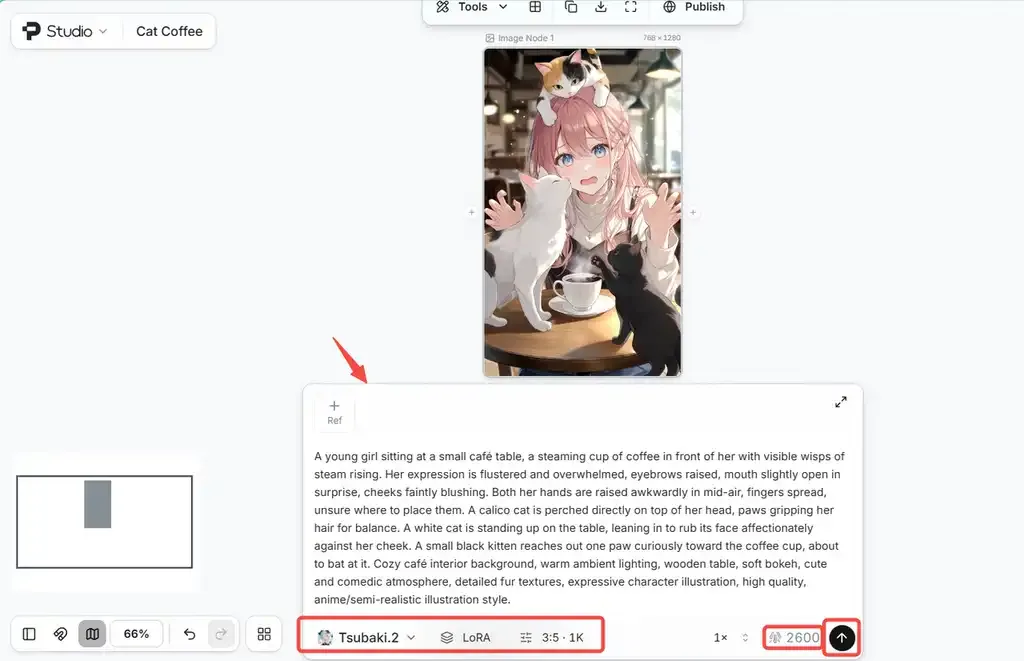
This way, you can add in text as you see fit, adjusting to fit the panels in a way that flows and makes sense. Using PixAI’s studio, you can create the perfect format and leave yourself plenty of room to go back and text as you see fit.
In-prompt lettering. This can be a helpful tool, especially if you feel like your dialogue could use a little work. Some AI comic tools will allow you to prompt text directly. That said, it isn’t perfect. Proceed with caution and make sure to review everything.
Though image models have come a long way and now allow for greater production value with far less time spent, they are far from perfect. Text can sometimes be unreadable or even misspelled. Utilizing in-prompt lettering can work just fine but don’t assume that it will come out 100% perfect every time.
Integrated comic editors for the win. PixAI is an excellent tool that can help you to not only drop in text where you see fit, but to adjust on the fly, switch styles, and do everything directly over top of already generated panels.
Creating comics doesn’t have to be a time-consuming process anymore. Utilizing a suite of fantastic tools and even image generation recipes can help bring your vision to life without all of the painstaking labor. Create your vision and bring it to life in no time with tools like PixAI’s image creation suite.
AI Writing Script Structures
There are times when utilizing AI for script writing purposes can feel a bit muddied. The key is to go into the process with a better understanding of how to keep things organized so that you can keep ideas structured and in their proper place.
When you begin to draft your script, it is important that you keep things like panel description and the corresponding dialogue in the same table row or text block. This will allow the generation engine to correlate them easily. Plus, you can keep track on your own to make sure that everything is properly placed.
It is also vital that explicit speaker tags be used. Make sure that every line has been tagged clearly. This makes it far easier for both you and the layout tool to know who is talking, what the right reading order is (top-to-bottom, left-to-right), and what type of balloon is best for that situation.
Finally, it is important to keep a limit on your balloon count. For the most part, the rule of thumb is to keep it to around two or three balloons per panel. This might not be a problem when manually creating comic panels, but the AI-generated artwork could become obscured if there are too many phrase bubbles or words present.
Typography and Lettering
A common mistake that comes with creating comics is not having a firm understanding of some of the best practices as it relates to typography and lettering. While there is no paint-by-numbers process for this, there are a few basic best practices that will carry you through the process.
Match the font to the mood. This is probably the most important rule. If the font doesn’t quite lineup with the overall mood of the panel, the two will clash. You might be partial to, say, sans-serif because it is clean. For a quiet conversation, it may be ideal, but you wouldn’t want to use it for a panel featuring something more exciting like action or horror.
For louder, more impactful moments, you should go with text that is a bit more scaled up. For those moments that are a bit more intimate, even whispered, something a bit more scaled down makes sense. The mood is the most critical piece of information required when building the dialogue for a panel; fail to match your text to the mood, and it comes off as out of place.
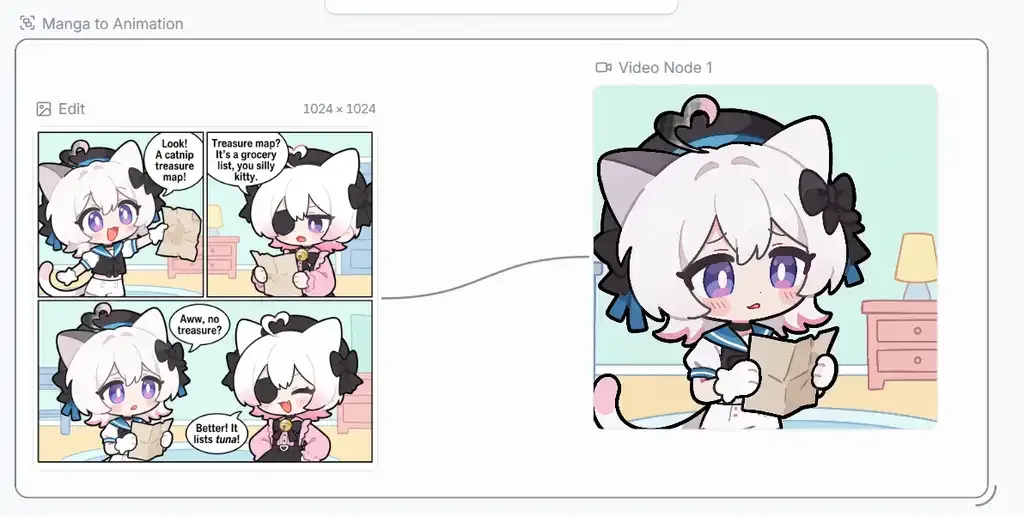
Balloon types. Just as it is important to match the font to the mood of the panel, it is equally important to use the right balloon type. It may seem like they are all the same, essentially a house for all the text, but there is so much more to it than that. There are four main types of balloons to consider:
- Round bubbles. This is the standard and is generally used for your average spoken dialogue.
- Spiky, jagged outlines. When things are more intense, when there is more action, or you need to convey a sound effect, this is the best option. It really emphasizes what’s happening in the bubble, bringing it almost off the panel and into the face of the reader.
- Narrations/captions. These should be a bit on the rarer side; you don’t want to use them every page. These rectangular boxes should offer things like distinct internal monologues or to state time and/or place jumps.
- Scalloped or cloud-like bubbles. You would want to use this type of balloon to show that the character is having internal dialogue.
Don’t underestimate the importance of choosing the right balloon type. It may seem like an inconsequential detail, but there is a time and a place to use each. Like using the wrong text, having the wrong balloon can throw off the entire feel of the panel.
Read everything out loud. Not sure of how a piece of dialogue will present? Take the time to read it out loud. If something feels a bit clunky or breathy, try breaking it up or editing out some of the more redundant words. Dialogue bubbles are more impactful when the text gets to the point without wasting words needlessly.
Workflow Tools are of the Utmost Importance
The process of putting together a comic and using AI comic lettering can feel like an overwhelming task without the proper tools at your disposal. Whether it be generating images, scripting and layout, or adding lettering and assembling the finish product, it helps to have the right creation suite.
PixAI is an excellent option for bringing your comic to life. Import images, draw or drop vector speech bubbles, tweak scaling, and bring consistency in your font layers throughout the entire project. Even better, you can structure multi-panel page scripts with just a few clicks.
Having big ideas but not being sure of how to bring them to life is no longer an issue. Using PixAI’s creation suite, you can bring even your brightest, most vibrant ideas to life in no time.
Creating Professional AI-Generated Comics
Your creativity is only limited by your imagination thanks to tools like PixAI’s image generation suite. You can take any idea and bring it to life by making use of the image generation query, creating highly readable, free-flowing comics in no time.
The key is to make sure that you understand formatting, lettering, script structuring, and all the intricacies that go along with the process. It will make the entire process far smoother, allow you to create precisely what is in your head, and avoid all the hassles that would have previously accompanied the creation of comics.
Comments
No comments yet — be the first.